
REPORT STUDIO
FOR ODOO 19
Design professional reports without writing a single line of code
See the full demo in action
1 MINUTE
Create a new report in just 1 minute
RIGHT CLICK
Context menu editing â edit, delete, duplicate, move
ZERO CODE
100% visual â no programming required
ANY MODEL
Works with every Odoo model and field
TWO POWERFUL BUILDERS
Choose the right tool for your report
QWEB BUILDER
Visual drag & drop editor for PDF and HTML reports
- WYSIWYG live preview editing
- 18 drag & drop components
- Dynamic field binding from any Odoo model
- 8 style presets + 20 page backgrounds
- Conditional visibility (if / elif / else)
EXCEL BUILDER
Spreadsheet-style editor for XLSX reports
- Familiar Excel-like grid interface
- 5 cell types: Text, Field, Formula, Image, Link
- Dynamic tables with auto data loops
- 6 chart types linked to data tables
- 5 template presets (List, Detail, Summary...)
- Download pixel-perfect XLSX files
SCREENSHOTS
See Report Studio in action
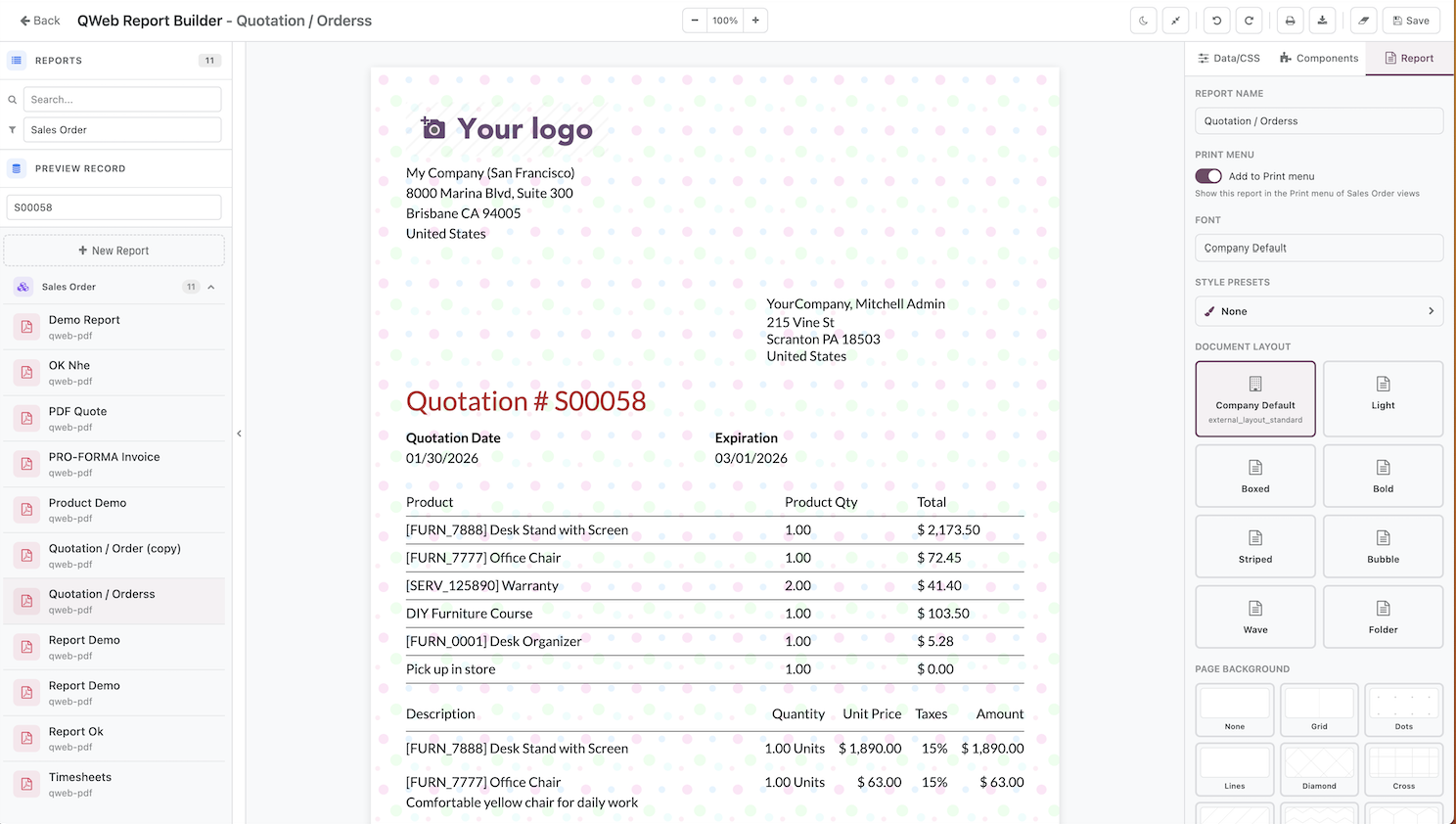
QWeb Builder â Drag & drop report editor
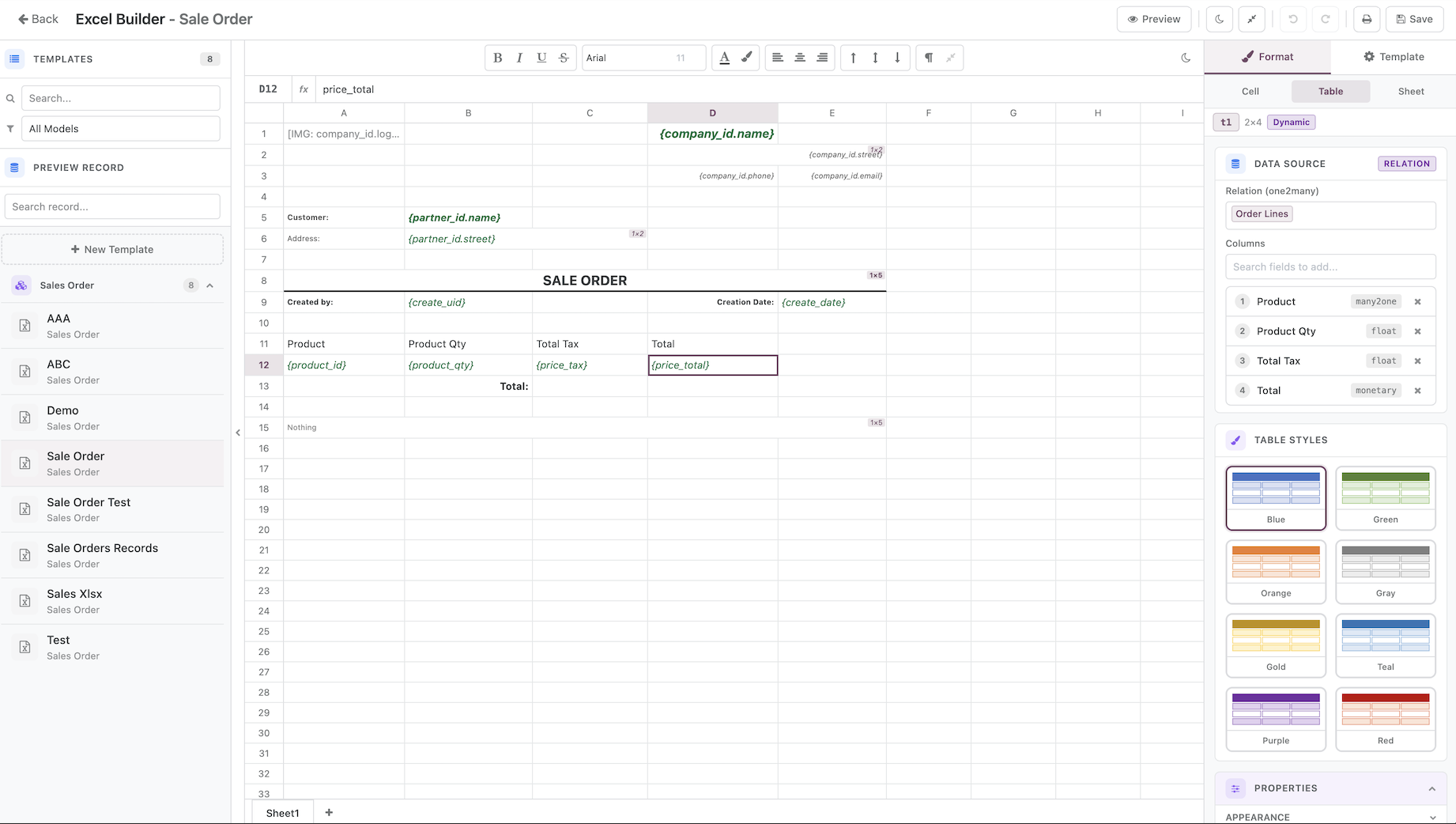
Excel Builder â Spreadsheet report editor
Dark Mode
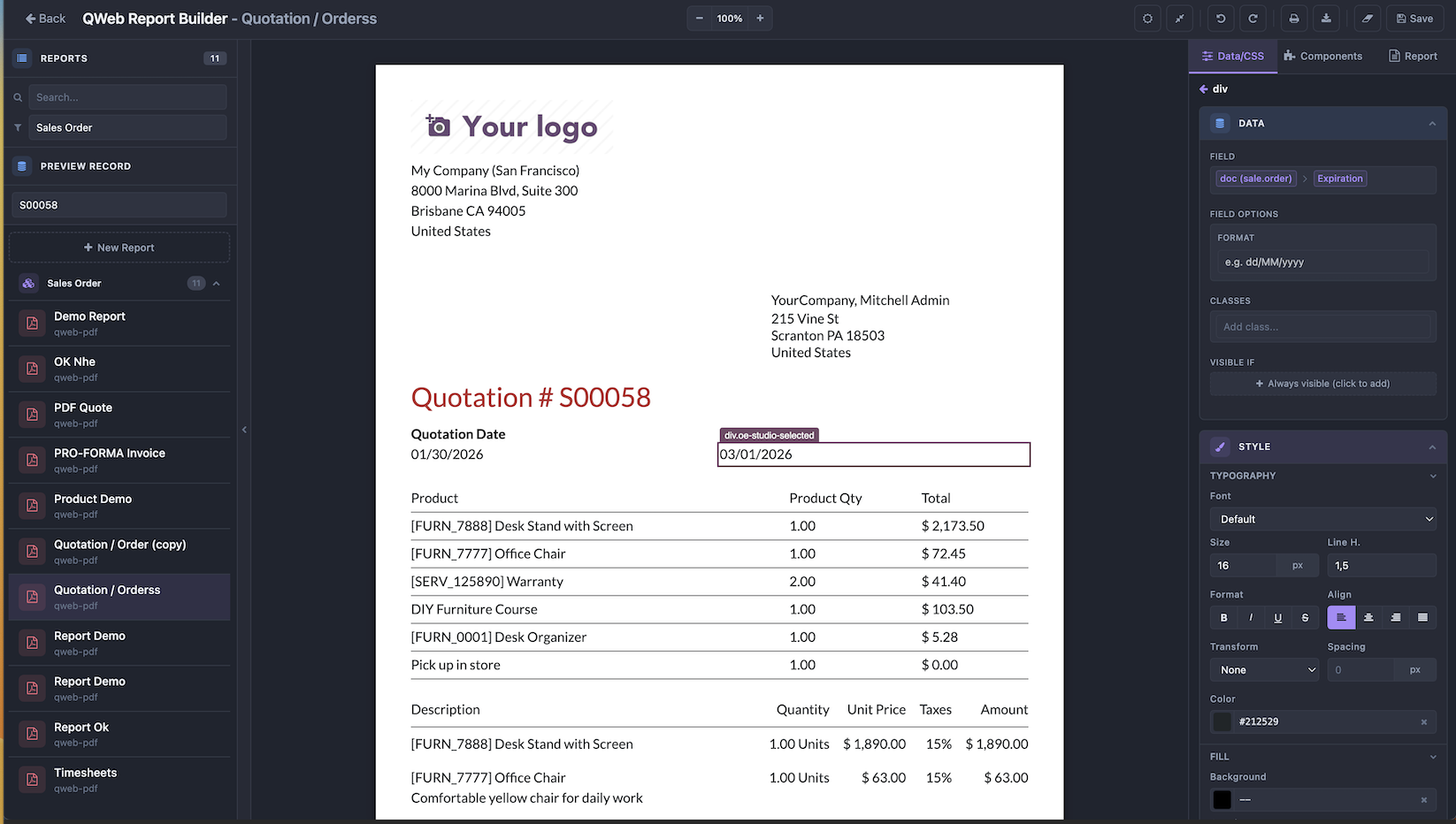
QWeb Builder â Dark Mode
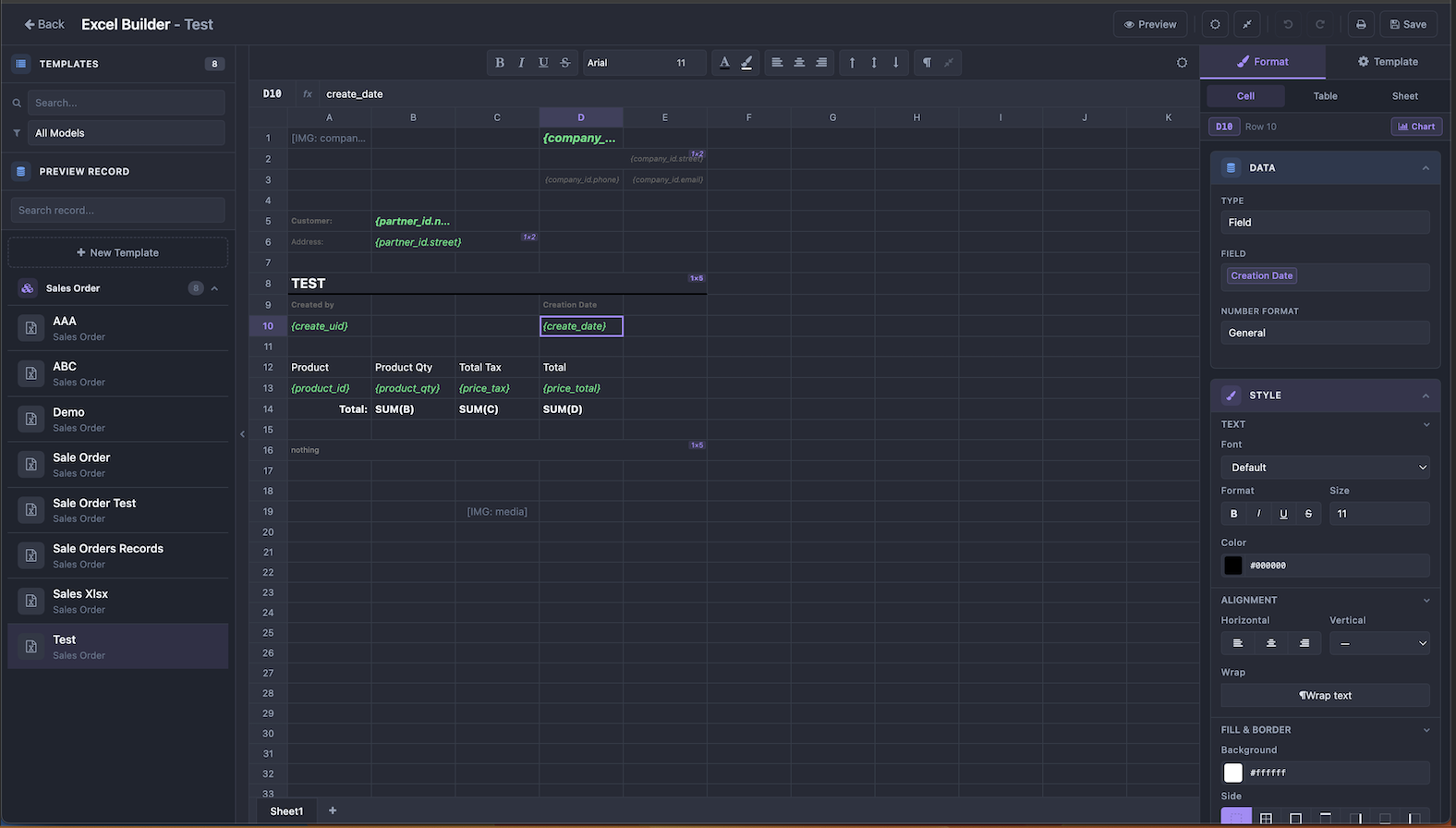
Excel Builder â Dark Mode
QWEB BUILDER
VISUAL EDITOR
WYSIWYG Live Preview
Edit directly on the rendered report. Click to select any element, hover to highlight with type label. Inline text editing and parent hierarchy tree navigation.
Zoom & Layout
Zoom 50%â200% with Ctrl+/- shortcuts. 3-panel layout with templates, editor, and properties side by side. Collapsible panels, fullscreen mode, dark mode.
Right-Click Context Menu
Right-click any element to edit properties, delete, duplicate, move up/down, add before/after, or wrap in container. Fast element manipulation without leaving the editor.
18 COMPONENTS
Build any layout by dragging components onto the report
Content (10)
Layout (7)
Advanced (1)
Smart drop targeting auto-finds the best insert point. Conditional chain protection keeps if/elif/else blocks intact. All components support drag & drop from the side panel.
DATA BINDING
Connect any Odoo data to your reports
Field Selector
Browse fields from any model with search. Follow many2one chains (order → partner → city). Context variables: doc, company, user, time.
Conditional Visibility
Show/hide elements with if / elif / else chains. Visual domain selector dialog. Chain protection keeps conditional blocks intact.
10+ Display Widgets
Contact, Barcode, QR Code, Image, Image URL, Monetary, HTML, Float time, Duration, Relative time. Each widget has configurable options.
Data Loops & Subreports
Iterate over record lists (e.g. order lines) with auto-generated t-foreach loops. Call subreports with nested context variables.
STYLING & DESIGN
30+ CSS Properties
Font, color, padding, margin, border, radius, opacity, background, display, class editor
9 Style Presets
Brutalism, Cartoon, Corporate, Elegant, Memphis, Minimalist, Pop Art, Swiss
20 Backgrounds
11 geometric + 9 artistic SVG patterns, or custom image upload
9 Font Families
Lato, Roboto, Open Sans, Montserrat, Oswald, Raleway, Tajawal, Fira Mono
DOCUMENT LAYOUT
Control the overall report appearance and page settings
Layout Selector
Choose from Odoo's built-in document layouts: Standard, Boxed, Clean, Striped. Or use the Company Default layout. One click to switch, one click to reset.
Font & Print Menu
Select from 9 font families (Lato, Roboto, Montserrat...). Toggle the report in Odoo's Print menu to make it available from any record view.
Page Background
Pick from 20 SVG patterns (geometric + artistic) or upload a custom image. Backgrounds render correctly in both editor and exported PDF.
MANAGEMENT
Undo / Redo
Snapshot-based history. Unlimited undo/redo with Ctrl+Z / Ctrl+Y.
Reset to Original
Restore report to its original state. Discard all changes instantly.
Print Integration
Attach reports to Odoo Print menu. Print directly from any record.
Template Manager
Create, duplicate, delete report templates. Quick create with model selector.
EXCEL BUILDER
GRID EDITOR
Cell Editing
Double-click or press Enter to edit any cell inline. A formula bar at the top shows the full content for quick editing. Navigate with Arrow keys and Tab, select ranges with Shift+Click, and use Ctrl+C/V/X for clipboard operations.
Context Menu & Sheets
Right-click any cell for a full context menu: insert/delete rows and columns, merge/unmerge cells, freeze panes, and insert page breaks. Create multi-sheet workbooks with add, rename, and delete â each sheet independent.
5 Cell Types
FULL FORMATTING
Text Formatting
Bold, Italic, Underline, Strikethrough. Font family, font size (6â72pt), font color, background color, and text wrap.
Alignment & Layout
Horizontal (Left / Center / Right), Vertical (Top / Middle / Bottom). Cell merge/unmerge and resize columns and rows.
Number Formats
Number with decimal places, Currency ($, VND, EUR...), Percentage, Date/DateTime, and Custom format patterns.
Cell Borders
All edges, box, or per-side. 6 styles: Thin, Medium, Thick, Dashed, Dotted, Double. Custom border color picker.
DYNAMIC TABLES
Tables that auto-populate with real Odoo data
Table Creation
Create tables from one2many relations or domain filters. Auto-generates header and data rows. Use the field picker to choose columns, add or remove them dynamically, and set a record limit per table.
Table Styling
8 built-in color themes with alternating row colors. Customize header, band, and outline colors. Choose from 4 gridline modes. Configure 0â3 header/footer rows and set custom column width and row height.
Sum & Aggregation
Select numeric columns for auto-sum. Generates SUM() formulas on dynamic data ranges that automatically adjust as rows expand during report generation.
Conditional Formatting
Add per-column rules using operators like >, <, ==, !=, contains. Set custom background and font colors for each rule. Supports multiple rules per column for complex highlighting.
CHARTS
Charts are linked directly to dynamic tables as their data source. Select a category column for the X-axis and one or more series columns for the Y-axis. Customize series names for the legend. Charts auto-size to the selected cell range on the grid and render pixel-perfect in the exported XLSX. Add multiple charts per sheet and manage them from the properties panel.
PREVIEW & EXPORT
Live Preview
Toggle Design/Preview mode. See actual Odoo data in the grid with a specific record.
XLSX Download
Pixel-perfect .xlsx files. Works in Excel, Google Sheets, LibreOffice. All formatting preserved.
5 Presets
Blank, Simple List, Master-Detail, Summary, Document â with visual configurator.
Print Settings
Paper size, orientation, custom margins, fit-to-page scaling.
Freeze & Breaks
Freeze header rows and left columns. Row and column page breaks.
Menu Integration
Print, Actions, and Cog menus. Download from any Odoo view.
SHARED FEATURES
Available in both QWeb Builder and Excel Builder
No Code
100% visual point & click. No programming, no XML, no Python required.
Odoo Native
Deep Odoo integration. Access any model, field, relation. Standard ORM & security.
Access Control
Report Studio Manager group. Only authorized users can edit reports.
Dark Mode
Full dark theme with CSS variables. Grid dark mode. Fullscreen editing.
Undo / Redo
Snapshot-based history. Unlimited undo/redo. Ctrl+Z / Ctrl+Y.
Shortcuts
Full keyboard shortcuts. Save, print, zoom, navigate, format â all from keyboard.
3-Panel Layout
Template list + editor + properties panel side by side. Collapsible left panel.
Responsive UI
Adaptive layout. Remembers panel state, zoom level, and theme preferences.
KEYBOARD SHORTCUTS
| Ctrl+S | Save changes |
| Ctrl+Z | Undo |
| Ctrl+Y | Redo |
| Ctrl+P | Print / Download report |
| Ctrl+/- | Zoom in / Zoom out (QWeb) |
| Ctrl+B/I/U | Bold / Italic / Underline (Excel) |
| Ctrl+C/V/X | Copy / Paste / Cut cells (Excel) |
| Arrows/Tab | Navigate cells (Excel) |
| Enter/F2 | Edit cell (Excel) |
| Delete | Clear cell content (Excel) |
| Escape | Cancel editing / Close dialog |
CONTACT US
Have questions? Need a demo? Get in touch!
Microsoft Teams
micheal.nguyen291996@gmail.comREPORT STUDIO
No-code report builder for Odoo 19
Version 19.0.1.0.0
LGPL Version 3
This software and associated files (the "Software") may only be used (executed,
modified, executed after modifications) if you have purchased a valid license
from the authors, typically via Odoo Apps, or if you have received a written
agreement from the authors of the Software (see the COPYRIGHT file).
You may develop Odoo modules that use the Software as a library (typically
by depending on it, importing it and using its resources), but without copying
any source code or material from the Software. You may distribute those
modules under the license of your choice, provided that this license is
compatible with the terms of the Odoo Proprietary License (For example:
LGPL, MIT, or proprietary licenses similar to this one).
It is forbidden to publish, distribute, sublicense, or sell copies of the Software
or modified copies of the Software.
The above copyright notice and this permission notice must be included in all
copies or substantial portions of the Software.
THE SOFTWARE IS PROVIDED "AS IS", WITHOUT WARRANTY OF ANY KIND, EXPRESS OR
IMPLIED, INCLUDING BUT NOT LIMITED TO THE WARRANTIES OF MERCHANTABILITY,
FITNESS FOR A PARTICULAR PURPOSE AND NONINFRINGEMENT.
IN NO EVENT SHALL THE AUTHORS OR COPYRIGHT HOLDERS BE LIABLE FOR ANY CLAIM,
DAMAGES OR OTHER LIABILITY, WHETHER IN AN ACTION OF CONTRACT, TORT OR OTHERWISE,
ARISING FROM, OUT OF OR IN CONNECTION WITH THE SOFTWARE OR THE USE OR OTHER
DEALINGS IN THE SOFTWARE.