
Login Page Studio
Customize your Odoo login page visually — no code required.
Key Features
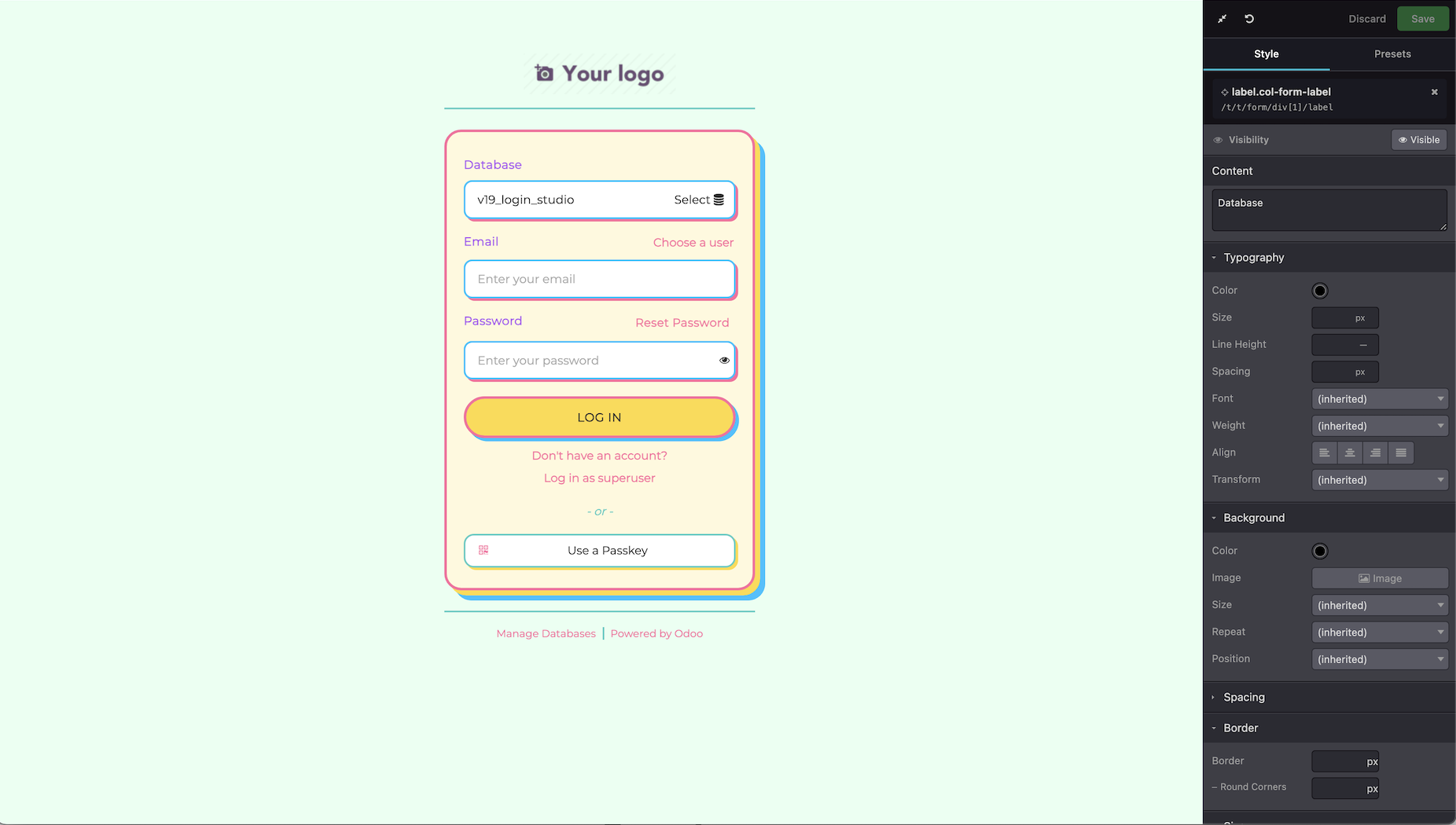
Visual CSS Editor
Edit typography, background, spacing, borders, size, opacity and box-shadow. 7 property groups with specialized editors.
Element Picker
Click any element on the live login page to select it. Hover highlighting and element label tooltips for easy navigation.
Live Preview
See every change instantly in an embedded iframe. No refresh needed — real-time visual feedback.
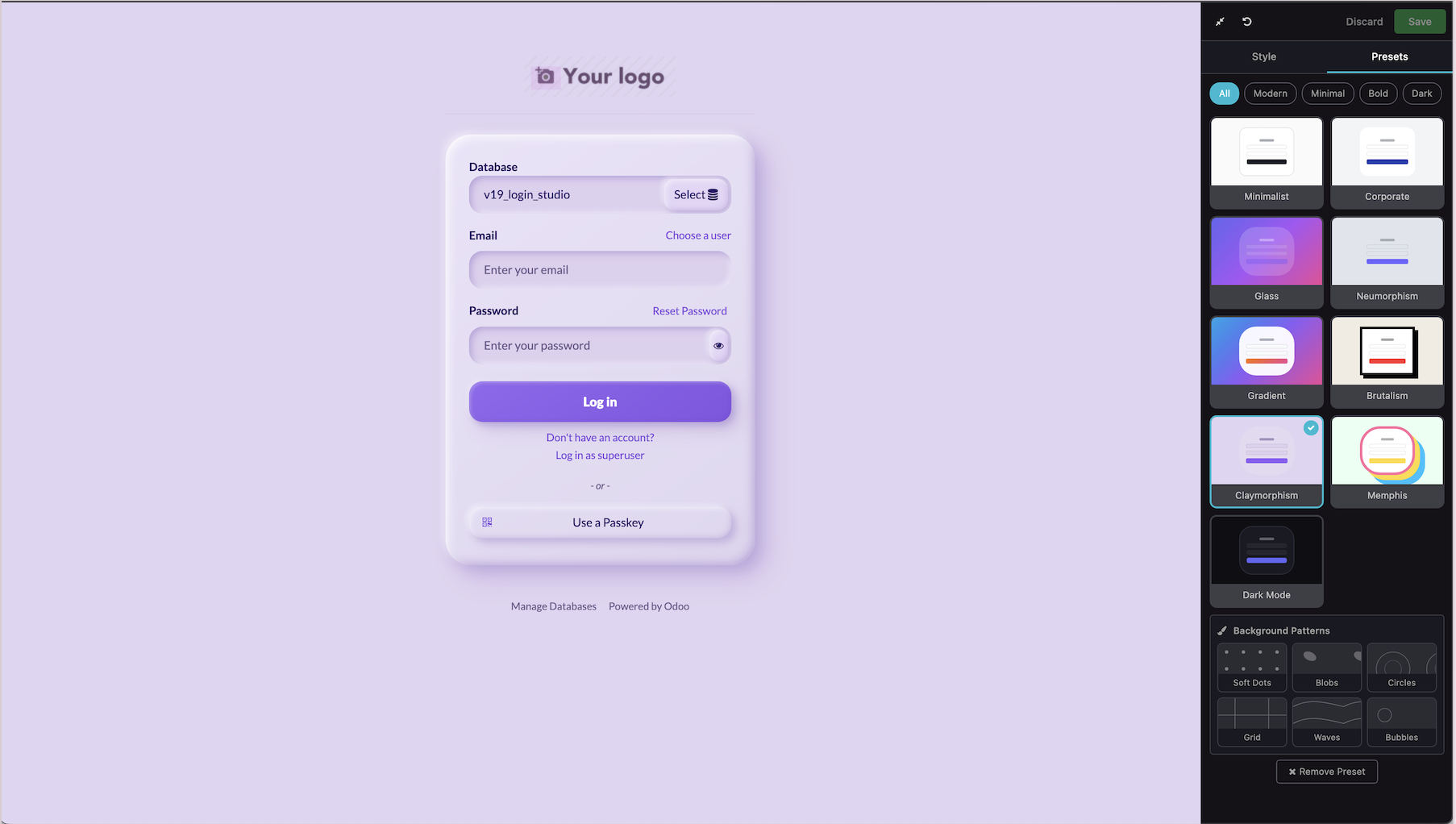
9 Design Presets
Minimalist, Corporate, Glassmorphism, Neumorphism, Gradient, Brutalism, Claymorphism, Memphis & Dark Mode.
54 Background Patterns
6 unique SVG patterns per preset. Two display modes: full-viewport overlay or card/form-only elements.
Header & Footer Styling
When Website module is installed, presets style the full header (nav, search, dropdowns) and footer automatically.
Save & Persist
CSS changes saved as inherited QWeb views (survive upgrades). Presets stored in system parameters. One-click reset to defaults.
Text & Visibility
Edit button labels, headings and text content directly. Toggle element visibility to show or hide any part of the page.
Admin-Only Access
All endpoints require admin privileges. XPath & CSS value validation prevents injection attacks.
How It Works
Open the Editor
Navigate to Administration > Login Page Editor to open the studio interface.
Click Any Element
Use the Element Picker to click on any element in the live login page preview.
Edit with Live Preview
Adjust colors, fonts, spacing, borders and more. Or apply a full preset with one click.
Save and Apply
Click Save to persist changes. They apply automatically to the live login page.
UI Presets
9 beautiful design presets. One click to transform your login page.
Screenshots
Technical Details
Compatibility
Odoo 19.0
Framework
OWL
License
LGPL-3
Type
Extension
Requirements
Contact & Support
Microsoft Teams
micheal.nguyen291996@gmail.comGet Started in Minutes
Install Login Page Studio and transform your Odoo login page today.
LGPL Version 3
This software and associated files (the "Software") may only be used (executed,
modified, executed after modifications) if you have purchased a valid license
from the authors, typically via Odoo Apps, or if you have received a written
agreement from the authors of the Software (see the COPYRIGHT file).
You may develop Odoo modules that use the Software as a library (typically
by depending on it, importing it and using its resources), but without copying
any source code or material from the Software. You may distribute those
modules under the license of your choice, provided that this license is
compatible with the terms of the Odoo Proprietary License (For example:
LGPL, MIT, or proprietary licenses similar to this one).
It is forbidden to publish, distribute, sublicense, or sell copies of the Software
or modified copies of the Software.
The above copyright notice and this permission notice must be included in all
copies or substantial portions of the Software.
THE SOFTWARE IS PROVIDED "AS IS", WITHOUT WARRANTY OF ANY KIND, EXPRESS OR
IMPLIED, INCLUDING BUT NOT LIMITED TO THE WARRANTIES OF MERCHANTABILITY,
FITNESS FOR A PARTICULAR PURPOSE AND NONINFRINGEMENT.
IN NO EVENT SHALL THE AUTHORS OR COPYRIGHT HOLDERS BE LIABLE FOR ANY CLAIM,
DAMAGES OR OTHER LIABILITY, WHETHER IN AN ACTION OF CONTRACT, TORT OR OTHERWISE,
ARISING FROM, OUT OF OR IN CONNECTION WITH THE SOFTWARE OR THE USE OR OTHER
DEALINGS IN THE SOFTWARE.